SubaruConnect puts Solterra controls and safety on your iPhone
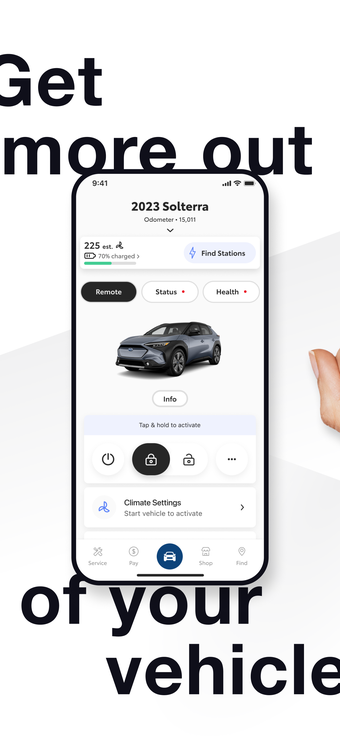
Start the car remotely, check battery level, and locate a parked Solterra from your iPhone: Remote Connect, Charging Management, and Find My Vehicle work together inside the app. Toyota Motor Sales U.S.A. Inc. supplies SubaruConnect as a lifestyle companion for Solterra owners, and it pairs with Apple Watch on iOS 15 or later. Core tools include remote climate control, vehicle status readouts, and 24/7 Safety Connect emergency access, aimed at primary drivers who manage charging and security on the go.
Daily remote control that covers warming, locking, and status checks
Remote Connect lets owners start or stop the vehicle and adjust climate control remotely, and the app also offers Remote Lock/Unlock and live vehicle status such as odometer and door/window state. Those capabilities map directly to morning and evening routines: preconditioning before a drive, confirming doors are locked from a shopping trip, and glancing at charge level before a commute.
Charging and station access tied to the vehicle’s EV systems
The app connects to the Solterra’s EV systems for battery monitoring and custom charging schedules, and it includes a charging station locator with integrated access to Tesla Superchargers for enrolled users. Because charging scheduling reads battery level in real time, drivers can set a session window and track progress from the phone, which matters for daily range planning and fleet-style use.
Safety services and vehicle health integrated into one interface
Safety Connect supplies 24/7 emergency assistance (SOS) and automatic collision notifications directly through the app, while Service Connect pushes vehicle health reports and maintenance alerts. These elements keep safety and basic diagnostics in a single place, reducing the need to consult the vehicle display for routine fault messages.
Setup, compatibility, and reliability caveats to expect
The app requires iOS 15.0 or later and supports Apple Watch, and several user reports mention initial account setup difficulties and occasional connectivity delays between the app and vehicle. The developer uses Toyota’s global connected mobility infrastructure to back services, and core remote functions require an active Connected Services trial or an activated Connected Services plan.
To sum up, SubaruConnect suits owners who want remote EV control, with setup caveats
For Solterra primary drivers who want remote climate, locking, charging oversight, and 24/7 emergency access, SubaruConnect delivers those daily utilities on iPhone and Apple Watch. Expect practical gains in convenience, but factor in setup friction and intermittent connectivity delays; those issues affect whether the app becomes part of a dependable daily routine.